
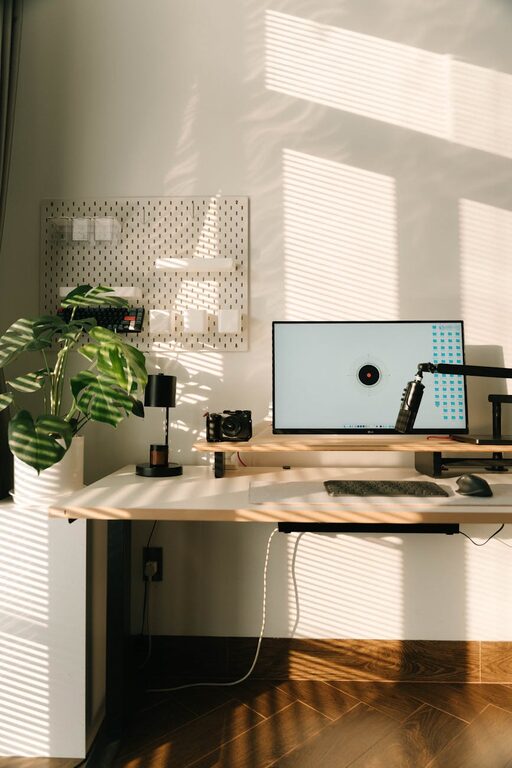
Creating an organized and clutter-free home office workspace is essential for maintaining productivity and reducing stress. Whether you work remotely full-time or just need a dedicated space for bills and personal projects, a clean and well-organized office can make all the difference. This post will share practical tips to help you design a clutter-free workspace that supports focus and efficiency.
Why a Clutter-Free Home Office Matters
A cluttered desk and workspace can lead to distractions, lost paperwork, and increased stress. Keeping your home office tidy not only improves your ability to concentrate but also makes it easier to find what you need quickly. Additionally, an organized space promotes a professional atmosphere, even if you’re working from home.
Step 1: Choose the Right Space
Start by selecting a quiet, comfortable area in your home dedicated to work. This space should be away from heavy household traffic and distractions. Having a consistent spot helps mentally separate work time from personal time.
Step 2: Declutter Before Organizing
Before adding organizing tools, clear out everything from your workspace:
– Remove old or unnecessary papers.
– Sort through office supplies; toss or donate unused items.
– Digitize important documents to reduce paper clutter.
Starting fresh makes it easier to create an orderly setup tailored to your needs.
Step 3: Invest in Smart Storage Solutions
Good storage is key to maintaining a clutter-free office. Consider these options:
– Desk with drawers: Keep frequently used supplies within reach.
– Shelves: Use vertical space for books, binders, or decor.
– File organizers: Separate paperwork by type or priority.
– Drawer dividers: Keep small items like pens and clips sorted.
– Cable management tools: Use clips and holders to keep cords tidy.
Choose storage that fits your available space without overcrowding.
Step 4: Create Zones for Different Tasks
Divide your workspace into distinct zones to streamline your workflow:
– Computer area: Monitor, keyboard, mouse.
– Writing area: Clear desk space for notes or paperwork.
– Supplies area: Containers or drawers for pens, staplers, and tools.
– Reference zone: Shelves or file holders for books and documents.
Organizing by task makes it easier to stay organized and find what you need.
Step 5: Maintain a Minimalist Surface
Keep your desk surface clear by limiting decorations and unnecessary objects. Use a small number of meaningful items like a plant or a photo. A mostly empty desk helps boost focus and reduces visual distractions.
Step 6: Establish a Filing System
Paperwork can quickly accumulate if you don’t have a system:
– Use folders labeled by category (e.g., bills, projects, receipts).
– Set up an “Incoming” file for new papers to sort daily or weekly.
– Recycle or shred outdated documents promptly.
Regular maintenance prevents paper pileup and lost documents.
Step 7: Go Digital Where Possible
Digitizing documents and notes not only reduces clutter but simplifies searching and sharing:
– Use cloud storage and digital note-taking apps.
– Scan receipts and important papers.
– Limit printing to essentials only.
Keeping electronic backups adds security and cuts down on physical space needed.
Step 8: Manage Cables and Electronics
Tangled cables are a common source of clutter. Keep cords organized using:
– Cable clips or ties.
– Charging stations that group device chargers together.
– Wireless accessories where possible.
Properly organizing electronics prevents damage and keeps your desk tidy.
Step 9: Develop Daily and Weekly Habits
Maintaining a clutter-free workspace is an ongoing effort:
– Spend 5 minutes at the end of each day tidying your desk.
– Review and file paperwork weekly.
– Clean electronics and surfaces regularly.
Consistent habits help prevent clutter from building up again.
Step 10: Personalize Thoughtfully
Adding personal touches can make your space inviting, but keep it balanced:
– Choose a few meaningful decor items.
– Use calming colors and good lighting.
– Incorporate ergonomic furniture for comfort.
A personalized, comfortable space supports motivation and reduces stress.
—
By following these tips, you can transform your home office into a clutter-free workspace that enhances productivity and peace of mind. Organizing doesn’t have to be overwhelming—start small and build habits that keep your space working with you. A clean desk is just the beginning of a more focused day!